


Adding Dining Dollars Gold to a student's JACard can be done online or in person. Funds will be available on the student's JACard on the following business day.
Online:
- Via Madison Money Manager (M3)
- eCheck (no service fee) and credit card (service fee) payment methods available
- Instructions are available below to add funds as a Student, Authorized User, or Guest payer
In Person or by mail at the University Business Office:
- Located at 738 South Mason Street MSC 3516, Harrisonburg, VA 22807 on the 5th floor of the Student Success Center
- Cash or check payment methods only
- Standard Hours: Open 8 a.m. to 5 p.m. Monday through Friday | Summer Hours: 8 a.m. to 5 p.m. Monday through Thursday and 8 a.m. to noon on Friday
About Dining Dollars Gold
Dining Dollars Gold is a declining balance plan that operates similar to a FLEX account, but for use exclusively in JMU on-campus dining operations.
Advantages of Dining Dollars Gold:
- No sales tax at any on-campus Dining retail location including East Campus Dining Hall and West Campus Dining Hall
- 5% discount at Dining retail locations (excludes East Campus Dining Hall and West Campus Dining Hall)
- No monthly service charge
- Unused balance carries from year to year
Participants in any of the meal plans begin with a Dining Dollars account as part of their meal plan which does expire at the end of the semester. Additional Dining Dollars may be added by opening a Dining Dollars gold account.
Difference between Dining Dollars Gold and FLEX:
- Dining Dollars Gold can only be used for dining on campus while FLEX can be used both on and off campus for a variety of activities
- Dining Dollars Gold transactions do not incur any sales tax while FLEX transactions incur normal sales tax
The duration of the FLEX and Dining Dollars GOLD accounts shall be from the opening date of the account until one of the following occurs:
- The account funds are depleted.
- A subsequent deposit or other circumstance result in a superseding account.
- Two semesters pass in which no transaction takes place within the account. (Refer to "Inactive Student Accounts" section below).
A Dining Dollars account is established with the purchase of any resident or commuter meal plan, and shall remain open until one of the following occurs:
- The account funds are depleted.
- At the conclusion of the spring semester, any unused balance will be forfeited.
A FLEX account may be opened by any student, faculty or staff member associated with JMU. A standard Dining Dollars account now comes with all meal plans purchased by resident and commuter students. Dining Dollars GOLD accounts may be opened by any JMU student.
General OperationUpon the customer's initial deposit which opens an account, the university will establish an electronic account balance in the customer's name and validate the customer's university access card for use in the electronic card readers. The customer may then use these funds for purchases where FLEX, Dining Dollars and Dining Dollars GOLD are honored. Purchases will not be allowed with a malfunctioning card.
Lost or Damaged Access Card ReplacementLost or damaged cards will be replaced by Card Services upon the customer's or university official's request. Such replacements will be made in accordance with current policies regarding card replacement. In most cases, the customer will be charged a replacement fee.
Liability for Illegitimate Use of AccountCustomers are responsible for safeguarding their own university access card. Should the card become lost or misplaced accidentally or by theft, the university assumes no responsibility for illegitimate withdrawals from the customer's account prior to the customer notifying Card Services during its normal business hours. During non-business hours, campus police and public safety should be notified. Upon notification, the account will be deactivated until the rightful owner has a new card made.
Transferring Account Funds to Another Card Holder's AccountAt any time, card holders may request to have funds from their existing FLEX or Dining Dollars GOLD account transferred to the existing account of another card holder with no service charge. Dining Dollars accounts are not transferable.
Inactive Student AccountsShould two semesters pass in which no transactions take place in a FLEX or Dining Dollars GOLD account, and there is a remaining balance, the university will refund the remainder through the University Business Office.
Depositing to Dining Dollars Gold
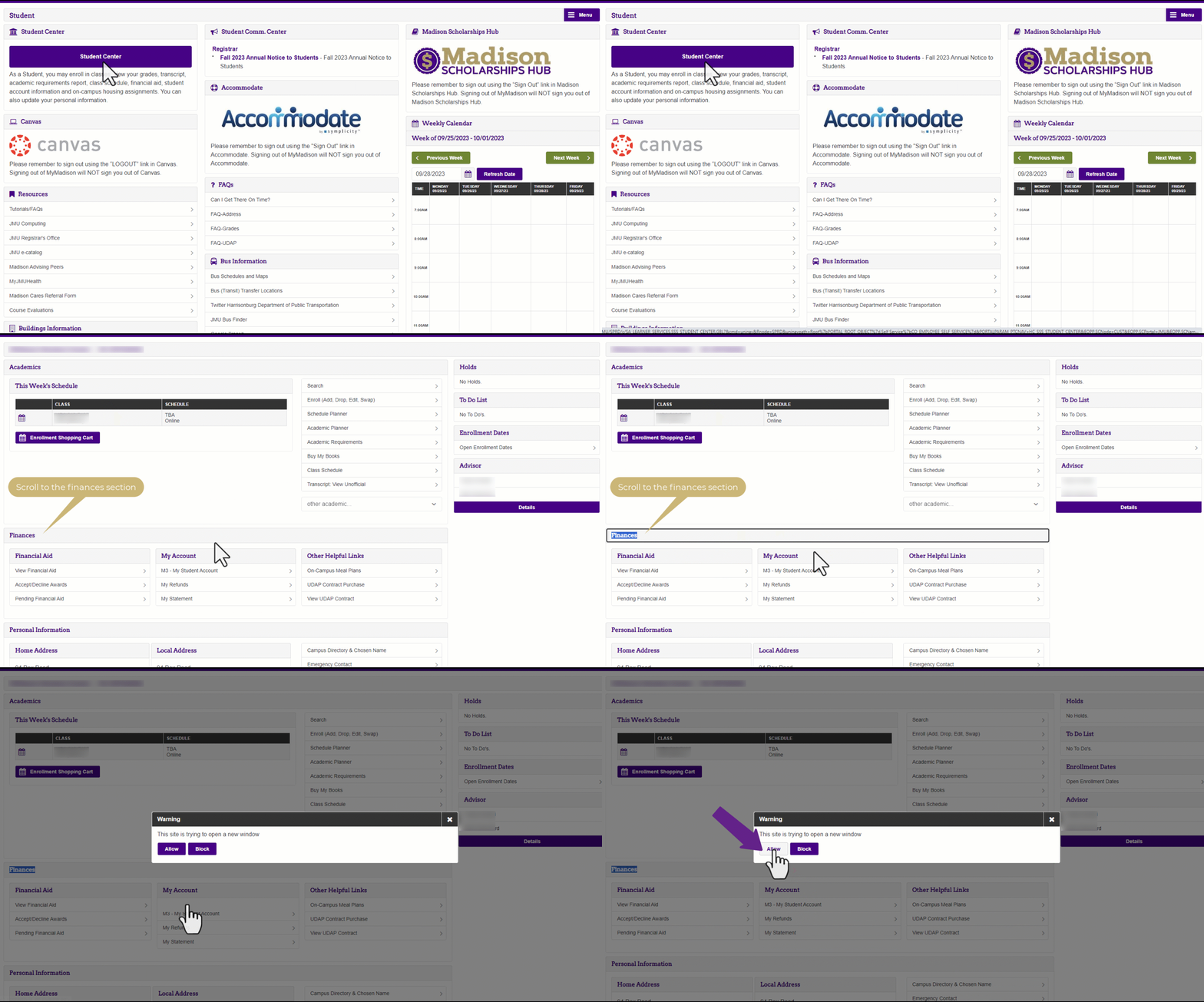
- Students log in to their MyMadison account.
- Click on the Student tab and then click on the Student Center button. Scroll to the Finances section and select M3 - My Student Account.
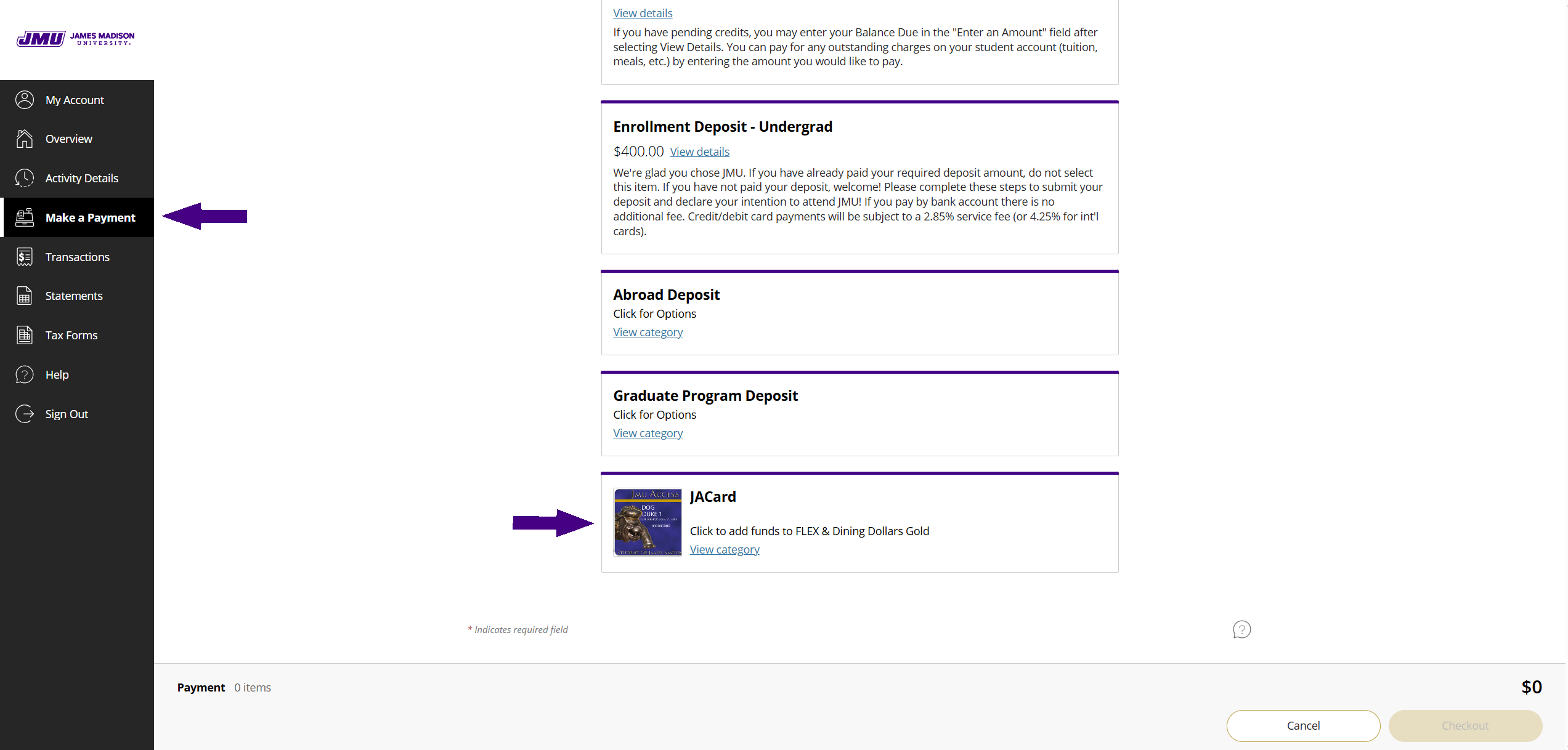
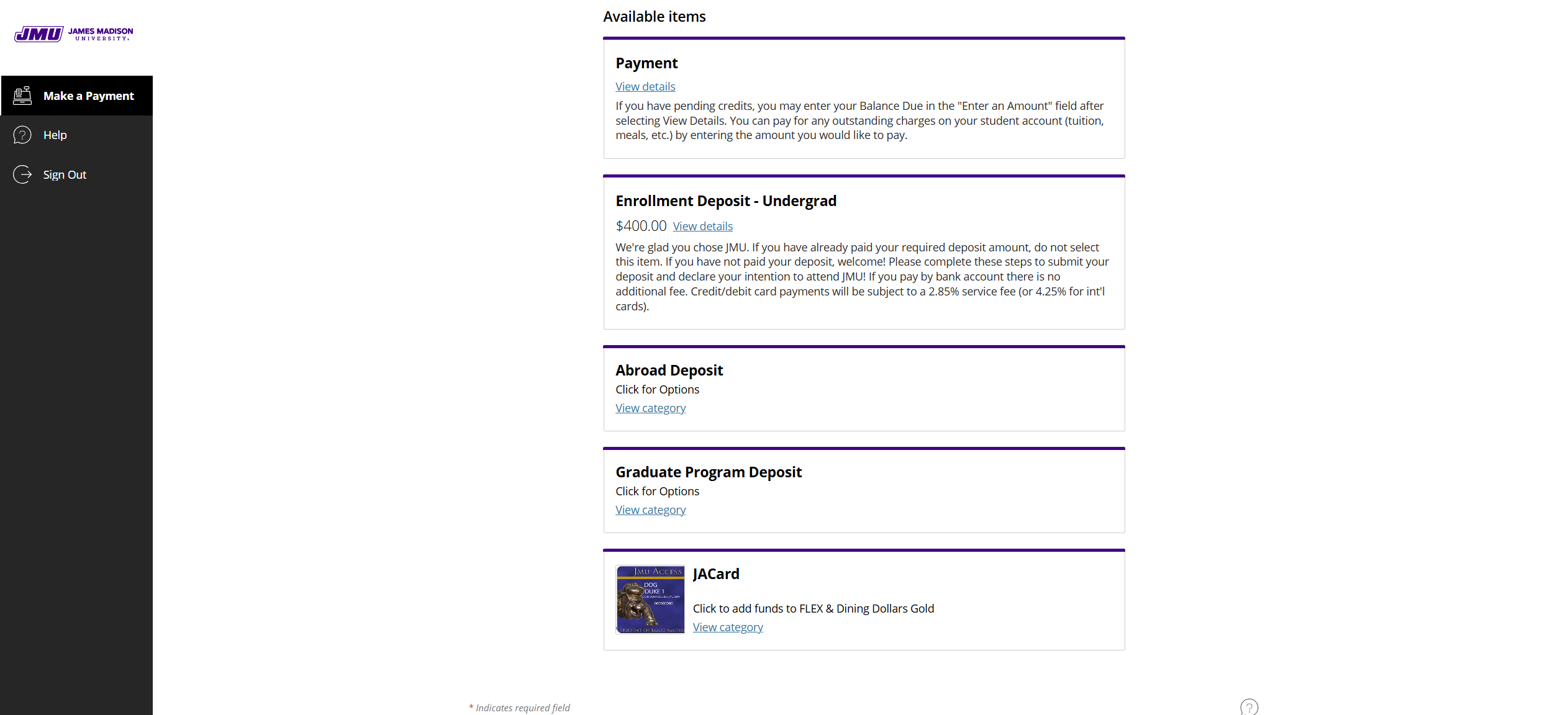
- Once in M3, click on the Make a Payment tab on the left side of the screen. Scroll down to the bottom of the page and select JACard.
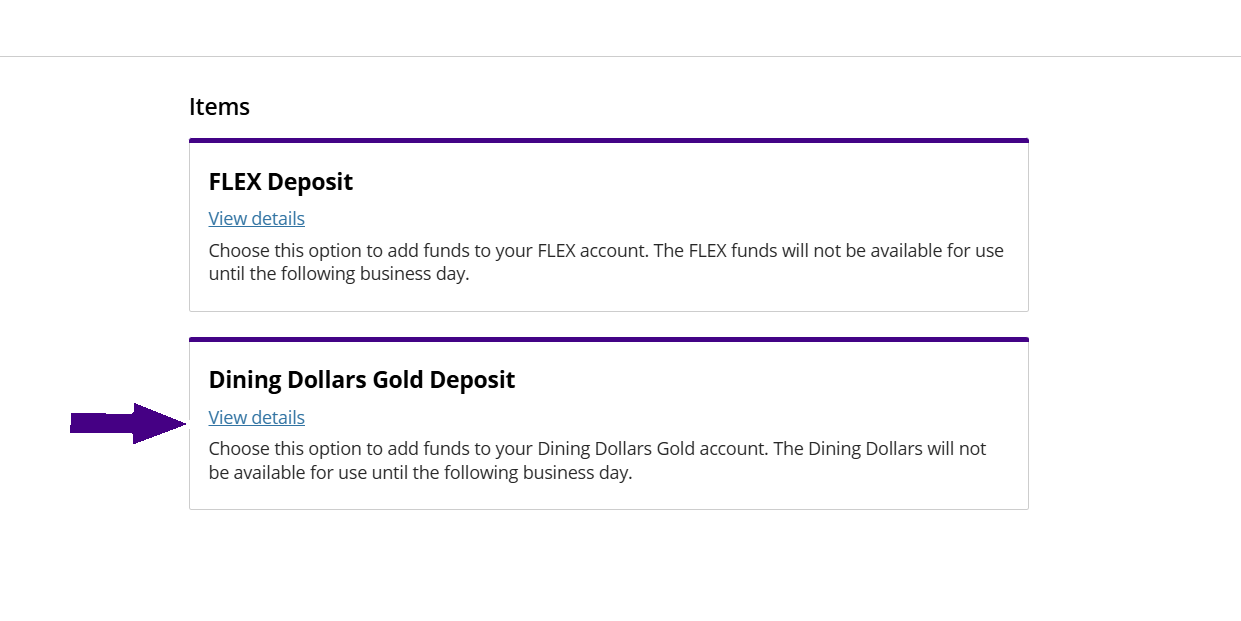
- Select Dining Dollars Gold Deposit.
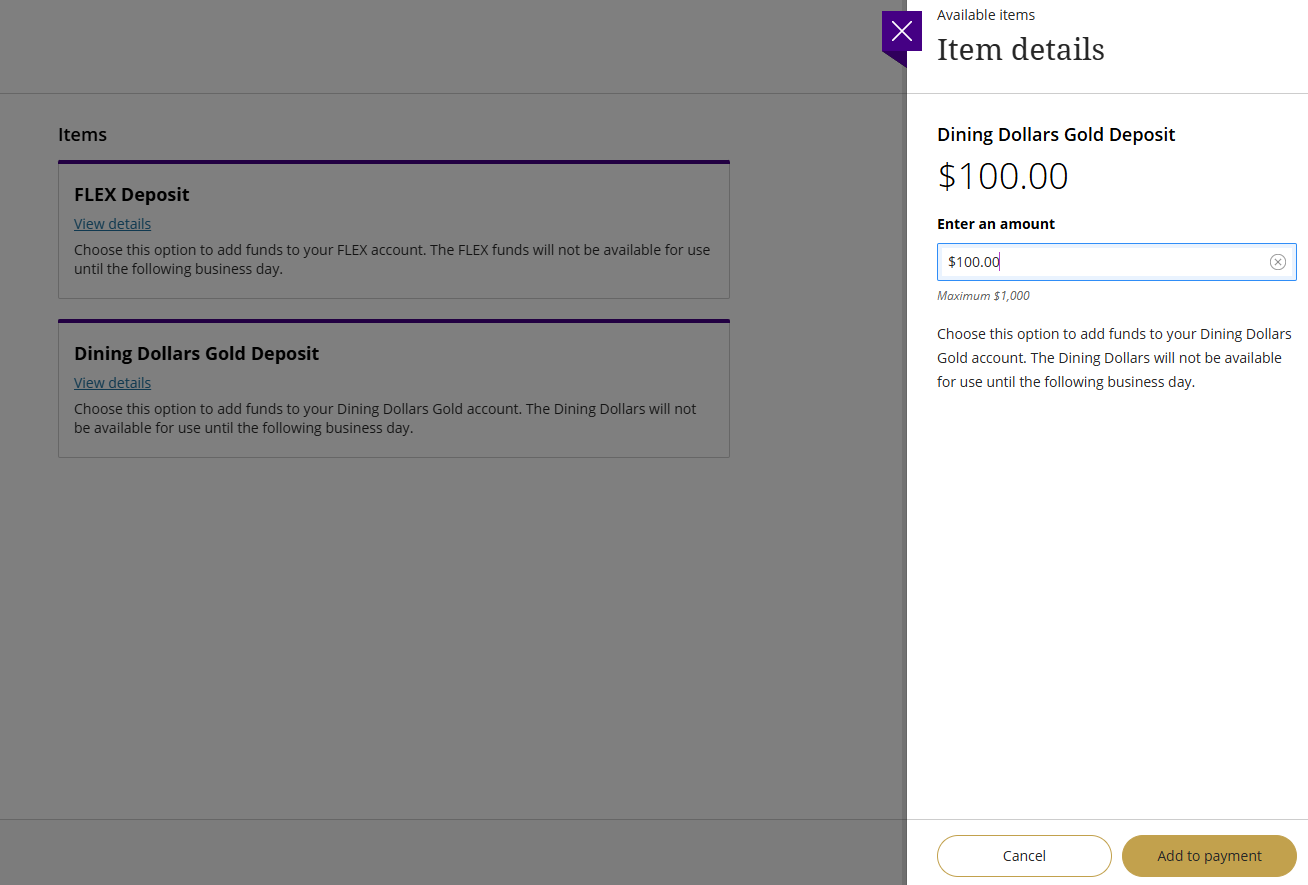
- A section will appear on the right side to complete. Enter the amount you wish to deposit to the Dining Dollars Gold account. Click Add to payment.
- Click Pay Now on the next screen.
- On the next screen, you will see what you just added. If it is correct, scroll to the bottom of this page and select the gold Checkout button.
- Add or use a saved payment method and follow the prompts until you reach the confirmation screen.
- Funds will be available on your JACard to use on the following business day.
- Authorized Users log in to the M3 Authorized User Portal.
- Once in M3, click on the Make a Payment tab on the left side of the screen. Scroll down to the bottom of the page and select JACard.
- Select Dining Dollars Gold Deposit.
- A section will appear on the right side to complete. Enter the amount you wish to deposit to the Dining Dollars Gold account. Click Add to payment.
- Click Pay Now on the next screen.
- On the next screen, you will see what you just added. If it is correct, scroll to the bottom of this page and select the gold Checkout button.
- Add or use a saved payment method and follow the prompts until you reach the confirmation screen.
- Funds will be available on the student's JACard to use on the following business day.
- If you are not an Authorized User on the student's account, add funds by going to the M3 Guest Portal. You will need the student's 9 digit student ID number and their last name.
- Once in M3, scroll down to the bottom of the page and select JACard.
- Select Dining Dollars Gold Deposit.
- A section will appear on the right side to complete. Enter the amount you wish to deposit to the Dining Dollars Gold account. Click Add to payment.
- Click Pay Now on the next screen.
- On the next screen, you will see what you just added. If it is correct, scroll to the bottom of this page and select the gold Checkout button.
- Add a payment method and follow the prompts until you reach the confirmation screen.
- Funds will be available on the student's JACard to use on the following business day.