


Adding FLEX to a student's JACard can be done online or in person.
Online:
- Via Madison Money Manager (M3)
- eCheck (no service fee) and credit card (service fee) payment methods available
- Instructions are available below to add funds as a Student or Authorized User
- Guest Payers are not able to add FLEX funds. Instead the student will need to set them up as an Authorized User
In Person or by mail at the University Business Office:
- Located on the 5th floor of the Student Success Center at 738 South Mason Street MSC 3516, Harrisonburg, VA 22807
- Cash or check payment methods only
- Standard Hours: Open 8 a.m. to 5 p.m. Monday through Friday | Summer Hours: 8 a.m. to 5 p.m. Monday through Thursday and 8 a.m. to noon on Friday
About FLEX
FLEX is a declining balance account that connects you with the JMU campus community. Similar to a checking account, purchases are deducted automatically and the balance is displayed after each transaction.
Advantages of FLEX:
- Use in many on and off campus locations
- Students can use FLEX to pay for any outstanding charges on their student account in M3
- No monthly service charges
- No need to carry cash - access with a swipe of the JAC
- Can't be used if your JAC is reported stolen
- Unused balance carries from year to year
- A 5% discount in JMU Dining Service Operations (excludes East Campus Dining Hall and West Campus Dining Hall)
Difference between FLEX and Dining Dollars Gold:
- FLEX can be used both on and off campus for a variety of activities while Dining Dollars Gold can only be used for dining on campus
- FLEX transactions incur normal sales tax while Dining Dollars Gold transactions do not incur any sales tax
Contract Duration
The duration of the FLEX and Dining Dollars GOLD accounts shall be from the opening date of the account until one of the following occurs:
-
The account funds are depleted.
-
A subsequent deposit or other circumstance result in a superseding account.
-
Two semesters pass in which no transaction takes place within the account. (Refer to "Inactive Student Accounts" section below).
A Dining Dollars account is established with the purchase of any resident or commuter meal plan, and shall remain open until one of the following occurs:
-
The account funds are depleted.
-
At the conclusion of the spring semester, any unused balance will be forfeited.
Eligibility
A FLEX account may be opened by any student, faculty or staff member associated with JMU. A standard Dining Dollars account now comes with all meal plans purchased by resident and commuter students. Dining Dollars GOLD accounts may be opened by any JMU student.
General Operation
Upon the customer's initial deposit which opens an account, the university will establish an electronic account balance in the customer's name and validate the customer's university access card for use in the electronic card readers. The customer may then use these funds for purchases where FLEX, Dining Dollars and Dining Dollars GOLD are honored. Purchases will not be allowed with a malfunctioning card.
Lost or Damaged Access Card Replacement
Lost or damaged cards will be replaced by Card Services upon the customer's or university official's request. Such replacements will be made in accordance with current policies regarding card replacement. In most cases, the customer will be charged a replacement fee.
Liability for Illegitimate Use of Account
Customers are responsible for safeguarding their own university access card. Should the card become lost or misplaced accidentally or by theft, the university assumes no responsibility for illegitimate withdrawals from the customer's account prior to the customer notifying Card Services during its normal business hours. During non-business hours, campus police and public safety should be notified. Upon notification, the account will be deactivated until the rightful owner has a new card made.
Transferring Account Funds to Another Card Holder's Account
At any time, card holders may request to have funds from their existing FLEX or Dining Dollars GOLD account transferred to the existing account of another card holder with no service charge. Dining Dollars accounts are not transferable.
Inactive Student Accounts
Should two semesters pass in which no transactions take place in a FLEX or Dining Dollars GOLD account, and there is a remaining balance, the university will refund the remainder through the University Business Office.
Returned Deposits
Returned FLEX and Dining Dollars Gold deposits are subject to a registration hold on the student's account if they result in a balance owed to the university for money spent.
Depositing to FLEX
-
Students log in to their MyMadison account.
-
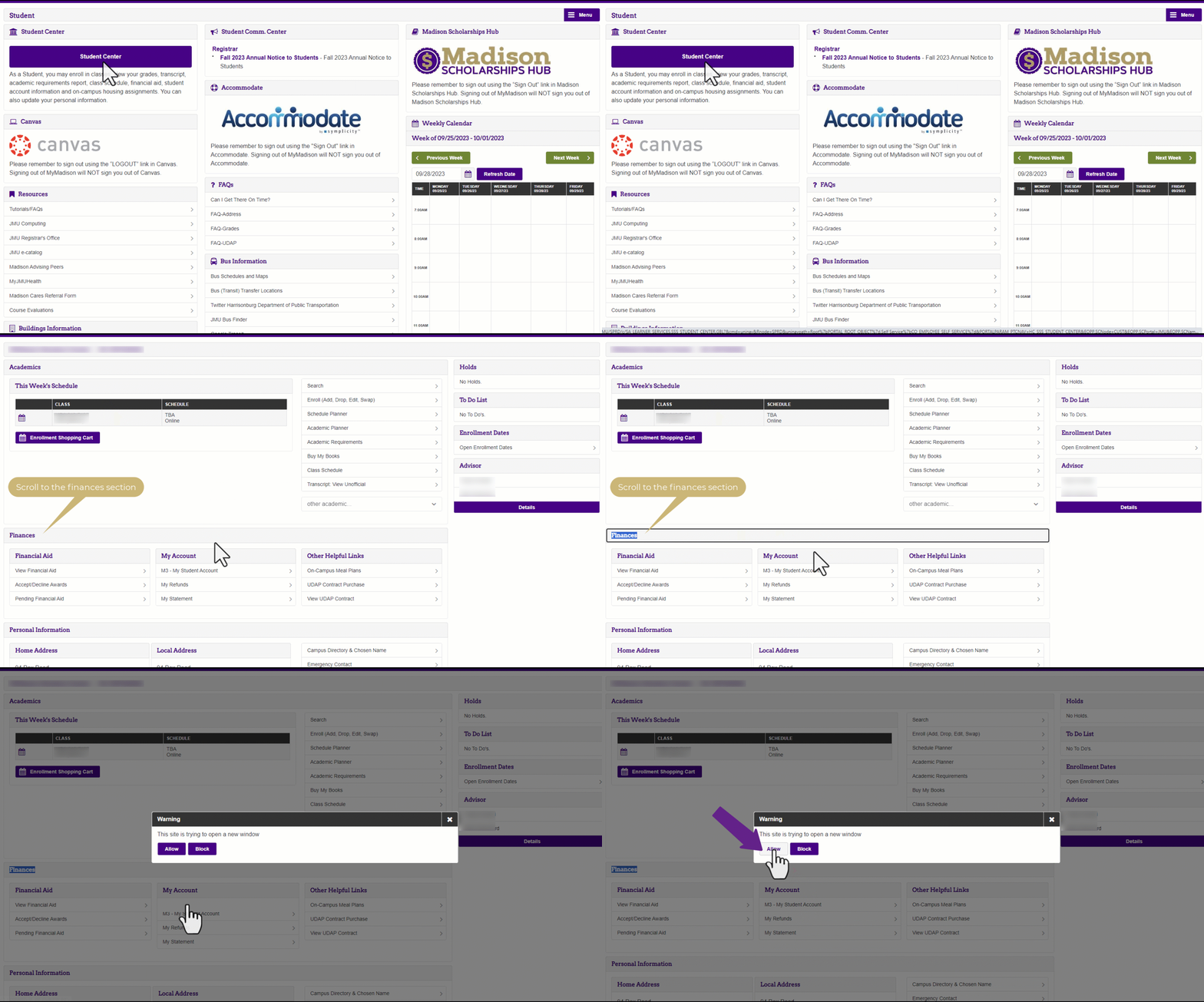
Click on the Student tab and then click on the Student Center button. Scroll to the Finances section and select M3 - My Student Account.
-
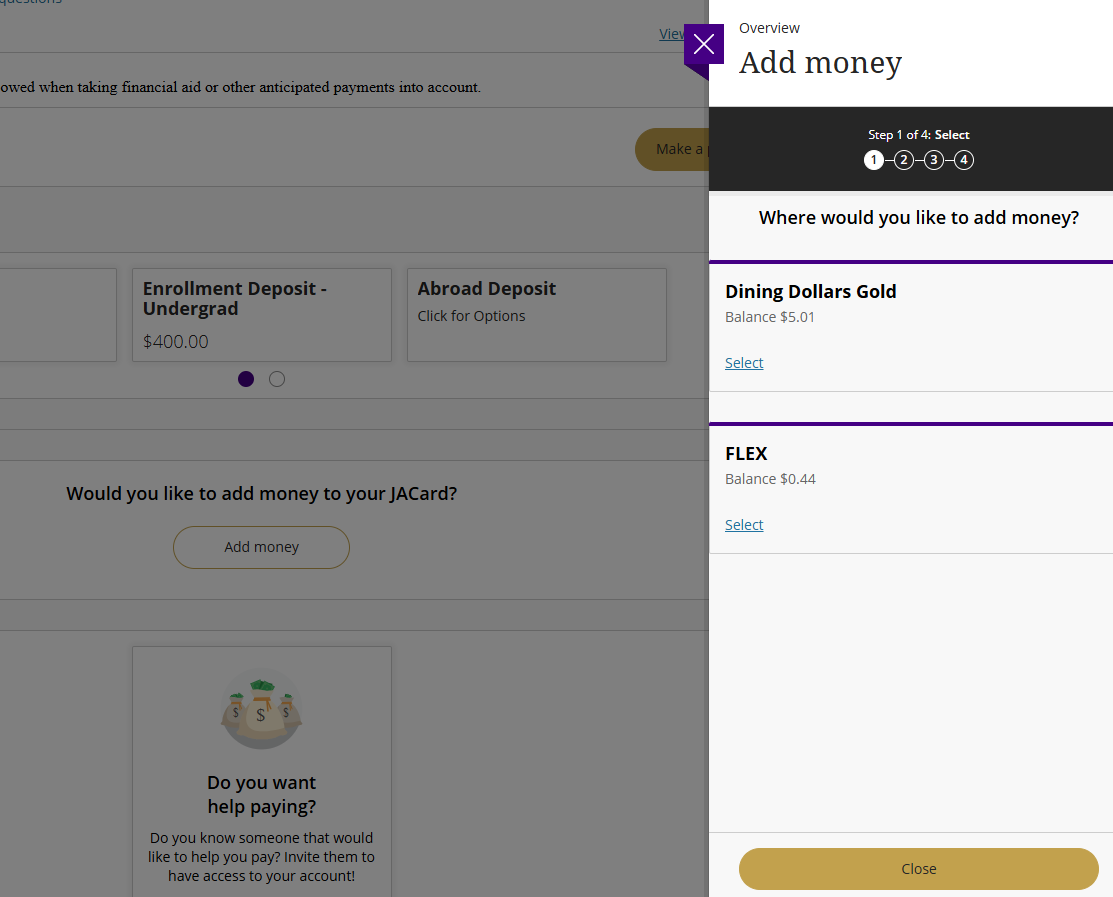
Once in M3, make sure you are in the Overview tab and then scroll down to the section that says, "Would you like to add money to your JACard?". Click on Add Money.

-
On the screen that appears on the right side, select FLEX.
-
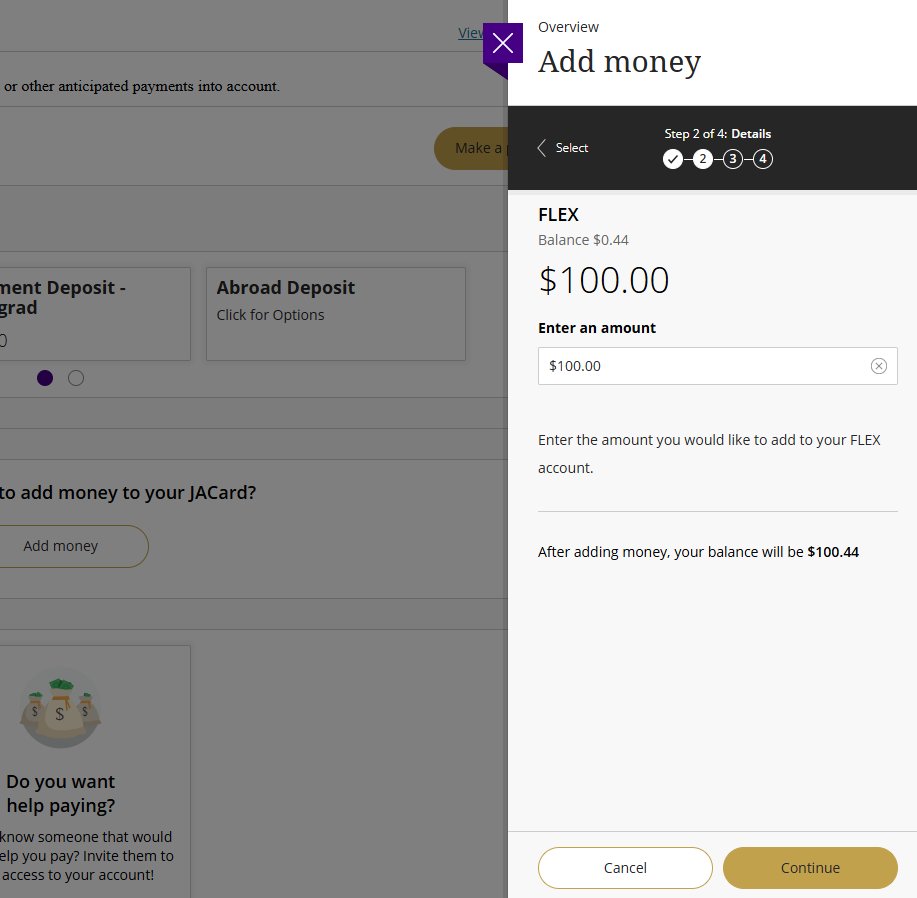
Enter the amount you would like to deposit into your FLEX account. Click Continue.
-
Add or use a saved payment method and follow the prompts until you reach the confirmation screen.
-
Funds are available immediately on your JACard.
If you have any questions, call the University Business Office at 540-568-6505 or email ubo@jmu.edu.
-
Authorized Users log in to the M3 Authorized User Portal.
-
Once in M3, make sure you are in the Overview tab and then scroll down to the section that says, "Would you like to add money to your JACard?". Click on Add Money.
-
On the screen that appears on the right side, select FLEX.
-
Enter the amount you would like to deposit into your student's FLEX account. Click Continue.
-
Add or use a saved payment method and follow the prompts until you reach the confirmation screen.
-
Funds are available immediately on your student's JACard.
If you have any questions, call the University Business Office at 540-568-6505 or email ubo@jmu.edu.
Faculty and Staff can view instructions on adding FLEX or purchasing meal plans on our Faculty and Staff FLEX/Meal Plan page.
Where to use FLEX
The JMU Access Card(JACard) is the most important and most often used card on campus. With a FLEX account, use the JAC as if it were cash in most campus locations. The following is a list of campus locations that take payment via FLEX.
-
Food Purchases - With a FLEX account, participants save 5 percent when buying meals and snacks in all campus Dining services locations.
-
Health Center - The JACard must be presented to be treated and receive any services from the University Health Center. FLEX can pay for in-house lab work and special programs.
-
Campus Parking Office - Present your JACard as identification to campus police, or use it in conjunction with a FLEX account to pay fines incurred on campus.
-
Postal Services - You must present your JACard to pick up packages or when you forget your combination. You can also use FLEX to pay for stamps and other postal supplies.
-
JMU Bookstore - FLEX can buy all the necessary school supplies.
-
Library (copy machines) - Use JACard to check out resources or to use reference material or use it in conjunction with a FLEX account to pay for copies.
-
Library (supplies & fines) - Pay for disks and overdue fines with a FLEX account.
-
Print Services - two locations - Both accept FLEX! High speed copiers, binding and supplies available. Design your resume or custom presentation at the graphic design center.
-
Athletic Events - JACard is the ticket to all university athletic events, including home football and basketball games.
-
Campus Concessions - While attending games and concerts, use FLEX for snacks.
-
Recreation Center - JACard is used to access all campus recreational facilities. You must use FLEX to pay for adventure rentals, team deposits, out-of-house equipment rentals, equipment center sale items, locker rentals, and towel service. FLEX is an option to pay for guest passes and program registration fees.
-
Vending Machines - Use FLEX to access most vending machines throughout campus and to buy your favorite snacks and sodas.
-
Laundry Machines - Use FLEX to pay for doing your laundry in the residence halls.
-
Mister Chips Convenience Store - FLEX can be used for snacks, household items, as well as Quiznos Subs
The following is a list of off-campus locations that take payment via FLEX.
|
Business |
Address |
Phone |
|---|---|---|
|
7-Eleven |
1911 Reservoir St |
(540) 432-7918 |
|
7-Eleven |
701 Port Republic Rd |
(540) 433-4712 |
|
Applebee's |
1860 East Market St |
(540) 438-8121 |
|
Buffalo Wild Wings |
291 University Blvd, Ste 103 |
(540) 438-9790 |
|
Campus Cookies |
1950 Deyerle Ave, #6 |
(540) 658-2751 |
|
Chanellos Pizza |
702 East Market St |
(540) 574-4700 |
|
Chipotle |
1615 Reservoir St |
(540) 433-0315 |
|
CVS |
780 Cantrell Ave |
(540) 434-6985 |
|
CVS |
1100 S High St. |
(540) 433-1158 |
|
CVS |
Port Republic |
(540) 433-2437 |
|
Dairy Queen |
78 S Carlton St |
(540)433-9585 |
|
Dominos Pizza |
31 Miller Circle |
(540) 433-2300 |
|
Dominos Pizza |
41 Burgess Rd. |
(540) 433-3111 |
|
Food Lion |
1021 Port Republic Rd |
(540) 433-4056 |
|
Food Lion |
85 S. Carlton St |
(540) 432-6314 |
|
Food Lion |
1751 S Hight St |
(540) 433-8099 |
|
Grace & Main Cafe |
710 S Main St |
(540)214-2290 |
|
Greens & Grains Café |
865 Port Republic Rd |
(540)433-1707 |
|
Grilled Cheese Mania |
1476 S Main Street |
(540)746-7515 |
|
Hangry Joe's Hot Chicken |
104 Burgess Rd |
(540)736-8221 |
|
Insomnia Cookies |
563 University Blvd, Space 170 |
(215)383-7320 |
|
J-Petal & Poke |
1645 Reservoir St, Ste 170 |
(540)615-5694 |
|
Ledo Pizza |
1820 Evelyn Byrd Ave |
(205)767-7014 |
|
Little Italy Pizza |
1469 South Main St |
(540) 432-1417 |
|
Macado's |
1950 Deyerle Ave |
(540) 434-2106 |
|
Mad River Mart & Deli |
710 Port Republic Rd |
(224) 817-5441 |
|
Maestro Barber Shop |
563 University Blvd., Ste #128 |
(540) 615-5471 |
|
Martins Food Market |
2035 East Market St |
(540) 442-7576 |
|
Moe's Southwest Grill |
1604 Stone Port Blvd |
(540) 442-3851 |
|
Pizza Hut |
2485 S Main St |
(540)433-1821 |
|
Pizza Hut |
1550 E Market St |
(540)209-9004 |
|
Qdoba Mexican Grill |
223 Burgess Rd |
(540) 564-1515 |
|
Roots Natural Kitchen |
1760 East Market St |
(540)407-2498 |
|
Sheetz |
798 East Market St |
(540) 433-6200 |
|
Sheetz |
533 University Blvd |
(540) 574-3072 |
|
Sheetz |
1825 South Main St |
(540) 574-3178 |
|
Starbucks |
715 Port Republic Rd |
(540) 433-1621 |
|
Subway |
865 Port Republic Rd |
(540) 574-3774 |
|
Sweet Frog Frozen Yogurt |
37 Burgess Rd |
(540)209-8671 |
|
Tacos4Life |
1645 E Market St |
(540) 471-0622 |
|
Thai Phanom |
1318 Hillside Ave |
(540)217-2761 |
|
The Little Grill |
621 N Main St |
(540)434-3594 |
|
Tropical Smoothie |
1011 Port Republic Rd |
(540) 217-5575 |
|
Tropical Smoothie |
43 Linda Ln |
(540) 383-8482 |
|
University Outpost Bookstore |
1221 Foresthills Rd |
(540) 432-0287 |
|
Urgie's Cheesesteaks |
245 E Water St |
(540) 615-5455 |
|
Vito's Italian Kitchen |
1039 Port Republic Rd |
(540) 433-1113 |
|
Vito's Italian Market |
1045 Port Republic Rd |
(540) 442-3886 |
|
Your Pie |
549 Spotswood Trail, Suite 1 |
(540) 615-5344 |