


Onboarding Model
- EPAR
- Confer with HR Consultants about salary, contract, etc.
- Submit ePAR with all necessary documentation
- Submit at least two weeks prior to start date
- HIRING PAPERWORK
- Employee completes all hiring paperwork with HR before they begin working
- Onboard clears employee to begin working
- GETTING STARTED/SYSTEM ACCESS
- Employee receives Okta IT activation email
- Review new hire checklist with employee and introduce people, culture, & expectations
- TRAINING AND DEVELOPMENT
- On the job & compliance training
- Continuous check-ins and communication
- Talent Development and IT Training


TABLE OF CONTENTS
EPAR BEST PRACTICES
- ePAR Basics
- What are ePARs used for?
- What changes are still on paper PARs?
- What are the part-time ePAR Account Codes?
- What are the full-time ePAR Account Codes?
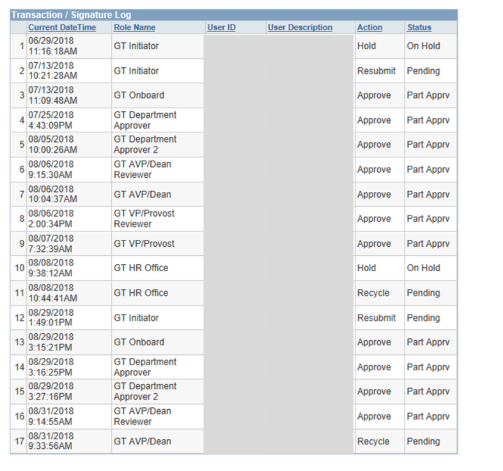
- How do I locate an ePAR?
- Which documents need to be attached to hire ePARs?
- Should completed reference checks be attached to ePARs?
- What are the main reasons ePARs are recycled?
- What is the ACA hours limitation (part-time employees)?
- How do I save an ePAR without submitting it?
- Miscellaneous ePAR Information
- Who can I reach out to with questions about the technical workings of an ePAR?
REFERENCES
- When should references be completed?
- How many references do I need for my hire?
- Who can I contact with questions about references?
ONBOARD BEST PRACTICES
- When should hire ePARs be submitted?
- What is the Onboard Specialist breakdown of customers?
- Why is onboarding important?
- What does effective onboarding look like?
- What documentation do all hires need to have on file?
- What is the Form I-9 for?
- What are the ramifications for causing a late I-9?
- What happens during the onboarding appointment?
- What paperwork does Onboard collect?
- How can I prepare my hire for their onboarding session?
- Can onboarding be completed virtually?
- My hire just worked here last month, why is Onboarding requesting documentation from them?
- When can my hire start working?
- What should I do to prepare my foreign national hire for onboarding?
- How will I know when my hire’s ePAR has been cleared by Onboard?
- What do the comments left in the ePAR by Onboard mean?
- How long does the onboarding process take?
- How long does it take for new hires (non-teaching employees) to gain access to the system?
- When do instructional and Adjunct (teaching faculty) hires gain system access?
- How do employees set up their JMU account?
- What is the employee orientation program at JMU?
- How can new employees participate in the UConnect program?
Electronic Personnel Action Requests (EPAR) Best Practices
FIRST! All ePAR initiators must take the ePAR training provided through IT Training. Sign up through MyMadison.
BEFORE SUBMITTING AN EPAR, ASK YOURSELF:
Do I have all of the necessary information?
- Confer with your HR Consultant to ensure the position type, salary, and contract (if applicable) is correct.
- Ensure you have all of your new hire’s pertinent information to submit the ePAR (including personal email and phone number).
When is the new hire’s start date?
- ePARs should be submitted at least 14 days before the the expected start date. The actual start date (Adjunct and Instructional Faculty) is the first day an employee completes any work for the university. ePARs should never be submitted after the new hire has already begun working.
Do I have an alternate approver set up?
- In case you go out of the office while the ePAR is in process, ensure you have an alternate approver set up that can take action on the ePAR in your absence. Contact Rachel Sellers at sellerrj@jmu.edu to get one set up.
Hires:
- New employee to JMU
- Rehire to JMU
- Transfer (new department or new position in same department)
- Concurrent job for someone already employed (TNT, RNT, WAGE, adjunct, etc.)
Existing Job Changes:
- To edit the existing job of an active employee working in your dept. (job code, supervisor, working title, promotion/adjustment)
- Administrative & Professional Faculty are on paper PAR with the salary adjustment form
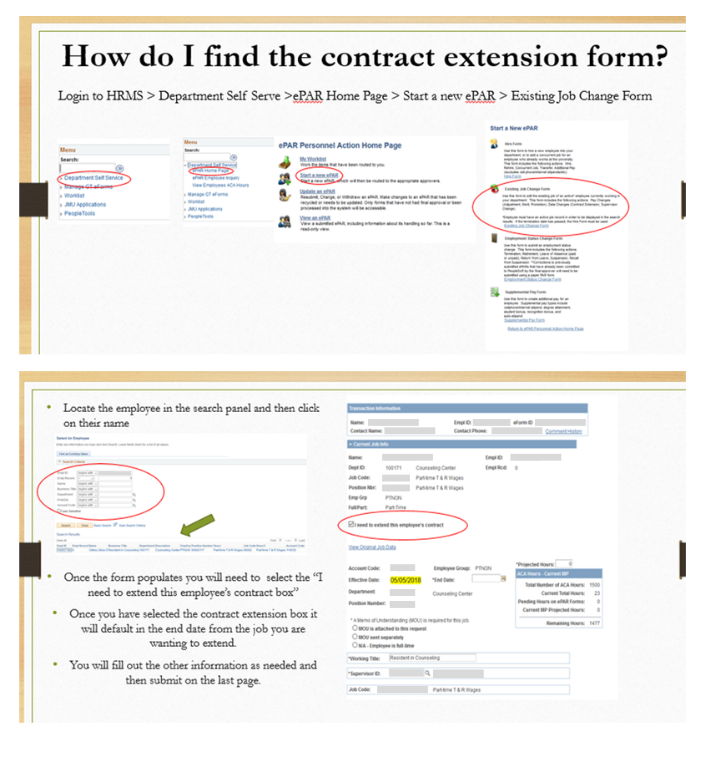
- Contract extensions (must be done before the end date has passed and you must check the “I need to extend this employee’s contract” box).
Employment Status Changes:
- Termination
- Suspension
- Retirement
- LOAP
- Return from leave
- Recall from suspension
- Cellphone/internet stipend
- Degree attainment
- Student bonus
- Recognition Bonus (Instructional, A&P Faculty, & Adjunct)
- Classified and wage must be submitted on the Employee Recognition Nomination Form
- Auto-stipends
Request to Recruit:
- Owned by Academic Affairs
- Used to recruit for full-time positions within Academic Affairs
- IBA Requests (Classified & Wage)
- Summer school hires/rehires
- Classified competitive salary offers
- Corrections to previously submitted ePARs
- To stop a cell phone stipend
- Instructional faculty moving from a one-year term to a RTA or tenure in the same position number
Wage (114100)
- Average of 29 hours a week (1,500 total) for measuring period 5/1 - 4/30
- Hours are tracked through JMU Time Entry System
- Hourly Pay
- Supervisor must be a full-time employee
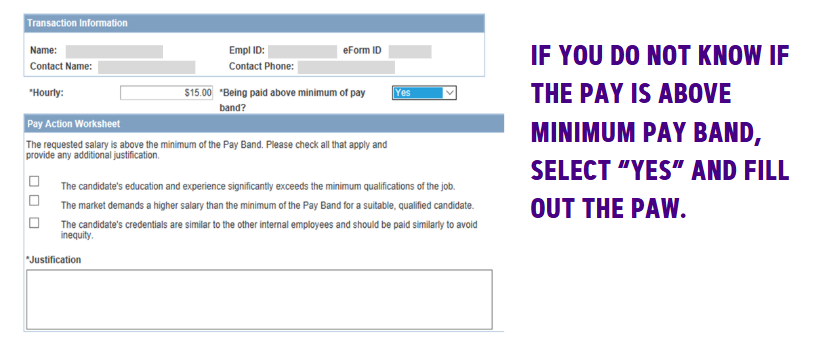
- If pay is above minimum pay band the Pay Action Worksheet (PAW) on the ePAR must be filled out (see example)
TNT (114530) – Temporary Part-Time Non-Teaching
- Employees who are also full-time cannot be hired on a RNT, they must be hired on a TNT.
- If they have a full-time job then TNT hours cannot be more than an additional 20 hours per week (60 hours combined with full-time job and TNT job).
- Supervisor listed should be supervisor of TNT job.
- MOU is required if they do not have a full-time job. (MOU can be found on the HR website under forms – Temporary Non-Teaching Employee (TNT)).
- Cannot work more than 1,500 hours total for any part-time job during measuring period of 5/1 - 4/30.
RNT (112130) – Reoccurring Part-Time Non-Teaching
- Reoccurring job (must be hired as a TNT first even if you know job will be reoccurring)
- Only can be RNT in Academic Affairs Division
- Cannot be a full-time employee
- Cannot work more than 1,500 hours in the measuring period of 5/1 - 4/30
- Supervisor listed should be supervisor of RNT job
- MOU is required (MOU can be found on the HR website under forms- Reoccurring Non-Teaching Employee (RNT))
- Teaching a credited course
- Dates for Adjuncts:
- Fall
- 1st Block – 8/10/(year) – 10/9/(year)
- 2nd Block – 10/10/(year) – 12/24/(year)
- Full Semester – 8/10/(year) – 12/24/(year)
- Academic Year – 8/10/(year) – 5/9/(year)
- Spring
- 3rd Block – 12/25/(year) – 3/9/(year)
- 4th Block – 3/10/(year) – 5/9/(year)
- Full Semester – 12/25/(year) – 5/9/(year)
- Contract terms would be left blank.
- Hours cannot be more than a cumulative 1,500 hours for the measuring period of 5/1 - 4/30.
- If you’re bringing an employee back to teach in the spring semester who is currently working in the fall semester, do a contract extension (see example on how to do a contract extension below).
- Contract extensions MUST BE DONE before 12/24.
- Fall
Classified (112300)
- If the salary is above the minimum pay band you will need to fill out the PAW.
A&P Faculty (112100)
- If salary is above minimum pay band you will need to fill out the PAW.
- Attach the Administrative & Professional ( A&P) employment agreement to ePAR (this can be found on the HR website under forms).
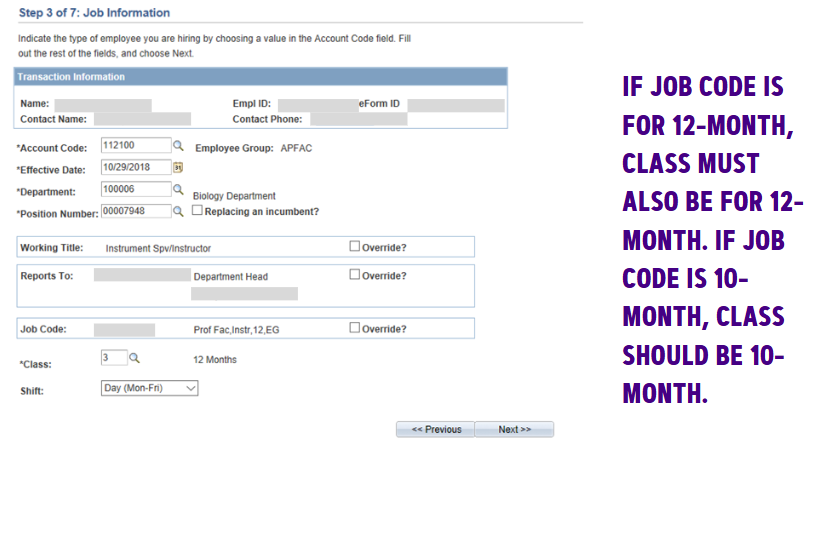
- Make sure the job code and Class section match (see example).
Instructional Faculty (112600)
- One Year Dates
- 8/10/(year) – 8/9/(year)
***Contract dates may be different but ePAR dates are for the entire year, unless contract buy-up is taking place.
- RTA Dates
- 8/10/(year) – no end date
- Tenure Dates
- 8/10/(year) – no end date
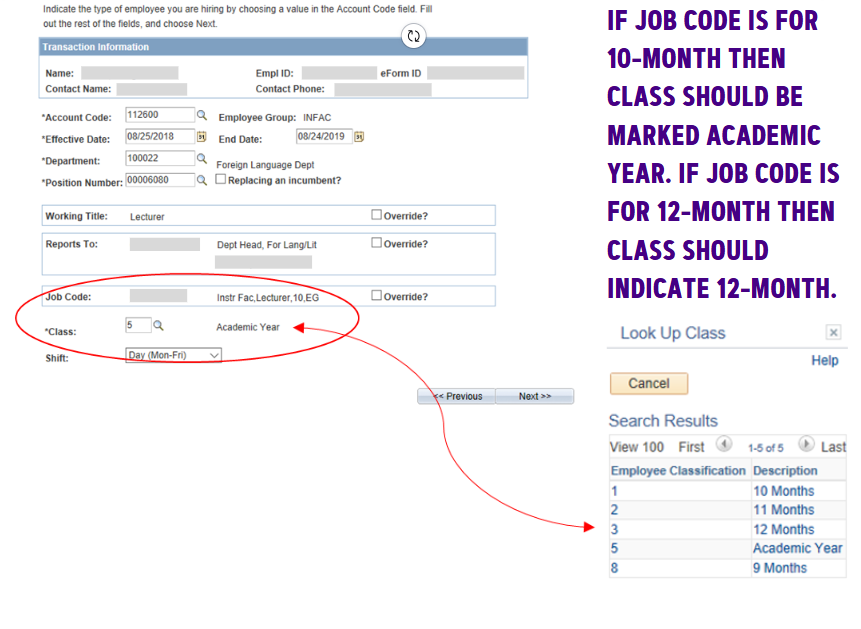
- Job code and class must match. (See example)
Navigate to...
- Department Self Serve
- ePAR Home Page
- View an ePAR
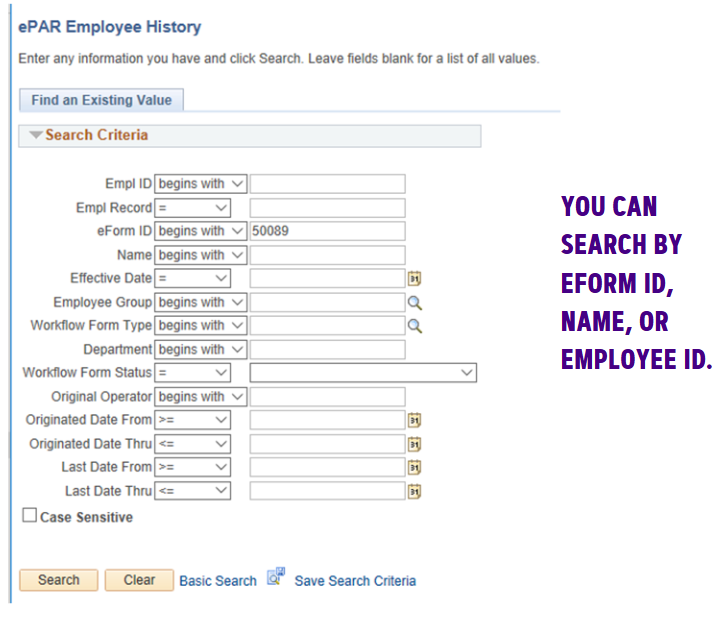
- Once the ePAR has opened up, click “next” until you reach the last page.
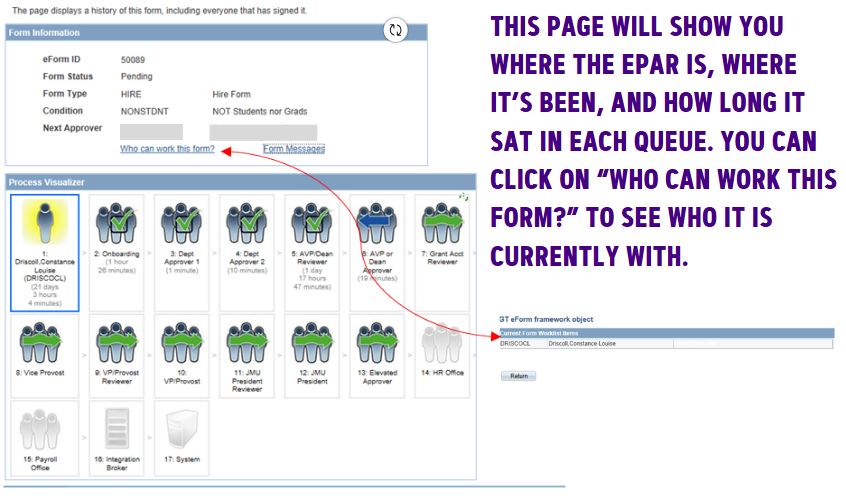
- The Process Visualizer will also show all activity on that ePAR.
- Wage – No document attachments required
- Classified - No document attachments required
- Adjunct– Adjunct contract required
- TNT/RNT – A TNT/RNT MOU (example can be found on the HR website)
- Administrative & Professional Faculty (A&P) – A&P contract
- Instructional Faculty – Either a FTA, RTA or TT contract depending on account code used
No, completed reference checks should be sent via email to jobs@jmu.edu.
- Incorrect dates
- Incorrect working title
- Class and job code don’t match
- Incorrect MOUs attached
- Incorrect account code used
- Unsigned documentation attached
- ACA hours over the limit
Part-time employees are limited to working 1,500 hours during the measuring period that runs from 5/1 - 4/30.
Use the hold button to save your work.
- Anyone leaving the university in a full-time job cannot be brought back in a part-time job for six months.
- All approvers must have signature authority on an org to be added to security routings.
- Grants can be added to ePAR. Reach out to Rachel Sellers at sellerrj@jmu.edu to find out how.
- To change security routings, email the request to Rachel Sellers at sellerrj@jmu.edu.
- Requests to add someone to security routings in an approver’s absence should be made at least three days in advance.
Questions, suggestions, or comments relating to the technical workings of the ePAR can be directed to Rachel Sellers, ePAR Coordinator, at sellerrj@jmu.eduor (540)-568-4997.
References
Reference checks should be completed before an offer is made and submitted to HR directly after an offer is accepted. In the case that required references are not timely submitted for your hire, HR will request them from you.
Submit completed references to jobs@jmu.edu.
New employee
- 3 professional references
Returning employee (more than one year since separation)
- 1 professional reference
Returning employee (less than one year since separation)
- 1 professional reference if there are no references on file with HR
- If there are completed references on file with HR from previous hire(s), no additional references are required. However, we do recommend that one additional reference be completed.
This applies to all Instructional Faculty, Adjunct Faculty, A&P Faculty, Classified, and wage hires. This also applies to student employees moving to wage employment. See Policy 1320 for more information.
Reach out to Leah Longo, Recruitment and Employment Services Assistant, at jobs@jmu.edu or (540)-568-3982.
Onboarding Best Practices
After you are sure you have all necessary information, submit the ePAR for your hire. ePARs should be submitted as soon as the offer is accepted, or 14 days before the start date, whichever is earlier.
We understand that sometimes individuals are hired within a short time frame. In these cases, reach out to the Onboard Specialists immediately after submitting the ePAR so that we can complete the onboarding process before your hire starts. Never allow a hire to begin working until the ePAR has been cleared by Onboard.
Hires with last name beginning with letters A-K: Priscilla Jones, (540)-568-3597, jones2ps@jmu.edu.
Hires with last name beginning with letters L-Z: Gage Kivlen, (540)-568-4473, kivlenga@jmu.edu.

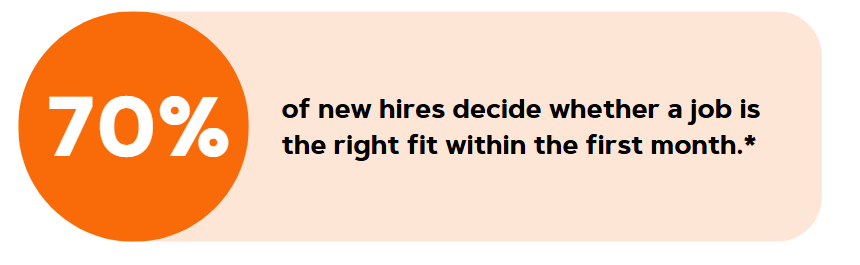
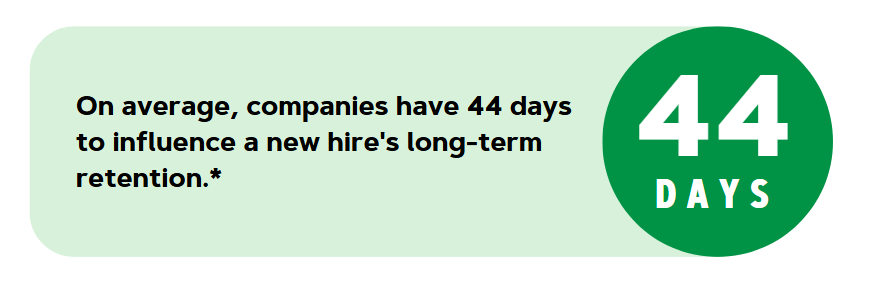
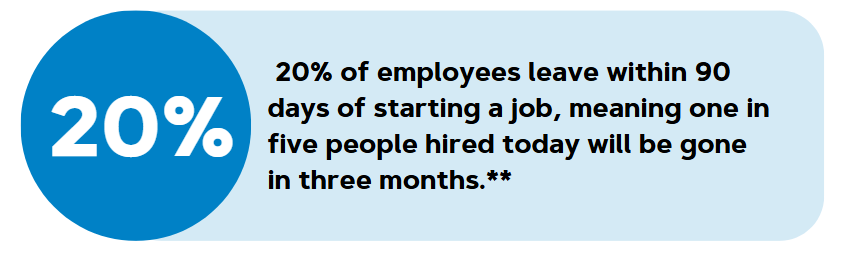
According to SHRM, onboarding is the process by which new hires get adjusted to the social and performance aspects of their jobs quickly and smoothly, and learn the attitudes, knowledge, skills, and behaviors required to function effectively within an organization.
 *
*- Effective onboarding provides clear expectations, outlines job responsibilities, and offers necessary training.
- A well-designed onboarding program facilitates connections with colleagues and supervisors.
Onboarding is a crucial opportunity to introduce new hires to an institution’s mission, values, and overall culture. A poor onboarding experience can amplify existing issues within an organization.





- A compliant Form I-9: A compliant Form I-9 means that the employee completed the I-9 on or before the date they began working and the information on the I-9 is correct.
- If information on the I-9 is incorrect and/or the I-9 was completed after the employee began working, a new I-9 will need to be completed.
- A completed background check
- A signed Policy Summary Acknowledgement
- A completed Selective Service Compliance Form (males only)
New hires and rehires that have been separated from the university for one year or more, will receive an email directing them to complete all of the above documentation, as well as schedule an appointment with HR Onboard to complete Section 2 of the I-9.
Rehires that have been separated from the university for less than one year and are found to be missing any of the required documentation will be contacted via email with directions on how to complete the outstanding forms.
Rehires that have been separated from the university for less than one year and have all necessary documentation on file will be cleared and will not be contacted by Onboard
The ePAR initiator and supervisor are copied on onboard welcome emails. If the same welcome emails for your hire are coming in everyday, that indicates that they have been unresponsive. Assist us in encouraging them to complete the onboarding process!
The Form I-9 is used to verify the identity and employment authorization of individuals hired for employment in the United States.
JMU Policy 1326 states that employees must have a valid I-9 on file before beginning work. All JMU employees must be authorized to work in the United States.
If an ePAR is submitted late and an employee begins working before Section 2 of the Form I-9 is completed, the hiring department may be penalized.
I-9s are subject to ICE and APA audit requirements. If an I-9 is completed after an employee begins working, JMU can be fined up to $2,789 for just that one I-9.
- The Onboard Specialist completes Section 2 of the new hire’s Form I-9.
- The new hire must bring their original, physical identification documents to the appointment, as these are needed to complete the Form I-9. A list of acceptable I-9 documents can be found at jmu.edu/humanresources/_files/I-9information.pdf.
- The Onboard Specialist provides information about:
- Benefits enrollment (full-time employees)
- IT access (JMU email, eID)
- Compliance Training
- Parking at JMU
- Obtaining a JACard
- ACA hours (part-time employees)
- MyMadison
- Employee Information Form
- Form W-4 - Employee’s Withholding Allowance Certificate
- Form VA-4 - Employee’s Virginia Income Tax Withholding Certificate
- Direct Deposit Authorization Form
- Selective Service Compliance Form (males only)
- Policy Summary Acknowledgement
It is HR’s responsibility to collect the above documentation. However, departments are responsible for collecting any department-specific paperwork from the employee.
- Tell your employee to look for an email from a member of HR Onboard with a link to the Onboarding Guide that includes instructions regarding their onboarding tasks.
- Encourage them to complete all onboarding tasks, as well as schedule their onboarding appointment, as soon as possible.
- The background check must be completed and returned to us before we can clear the employee to begin working. A delay in completing the background check authorization may result in a delayed start date.
Employees can choose to attend their onboarding appointment in-person or virtually (via Teams), whichever suits them best! Employees can schedule their appointments through the Onboarding Guide on the HR website. This Onboarding Guide is sent to new employees and instructs them on how to complete the necessary onboarding tasks.
When an employee returns to the university after having a break in service, HR is permitted to review their documentation and ensure all necessary hiring paperwork is on file at the time of rehire. If upon review it is found that an employee does not have all required documentation, HR must reach out to the hire to collect any outstanding paperwork. A break in service can be as little as one day.
Regulations may change from the time of initial hire to rehire, so it is Onboarding’s job to ensure all current hiring requirements are met.

 If your new hire’s ePAR has been cleared by Onboard, that indicates that they have completed the process and are permitted to begin working! Let’s get them started!
If your hire is a foreign national that requires work authorization or visa sponsorship, please connect them with the International Student & Scholar Services (ISSS) office in the Center for Global Engagement (CGE) as soon as possible. As the employment authorization and visa process can be lengthy, it is important to connect your new foreign national hire with CGE-ISSS as soon as they accept the offer and/or sign the contract. If your foreign national hire does not have the necessary paperwork to show their authorization to work in the U.S. when their start date arrives, they will not be able to begin employment at JMU. Reach out to CGE-ISSS (isss@jmu.edu) or HR Onboard (onboard@jmu.edu) if you have any questions.
To be proactive, after your new hire accepts the offer, tell them that they will need to have documents that show both identity and eligibility to work in the U.S. in order to complete the Form I-9, one of the most important pieces of the onboarding process. If your hire indicates that they are in the process of attaining that documentation or need assistance with the process, connect them with ISSS immediately.

After the hire completes the onboard process with all the necessary documentation, the Onboard Specialist will approve the ePAR. The ePAR initiator should receive an email from auto_notification@jmu.edu notifying them that the ePAR has been approved, which indicates that the employee is eligible to begin working.
The timeline for the onboarding process heavily depends upon how quickly the hire completes their onboarding tasks. Onboarding can be completed quickly or can take longer if the hire doesn’t complete the onboarding tasks right away. As the work authorization attainment process can be lengthy, foreign national hires may have a prolonged onboarding timeline as they await their documents’ arrival. Background checks are completed by an outside vendor and processing times vary. A delay in receipt of background check results can also delay the process.
Encourage your new hire to complete the following as soon as they recieve the welcome email to try and reduce unnecessary delays:
- Background check authorization
- Section 1 of the Form I-9
- The hiring paperwork (sent via Adobe Sign)
There is no established timeline for Okta access to be granted after Onboard has cleared the ePAR. The ePAR must be fully processed before the employee gains access to the system. As the ePAR process relies upon clearance from Onboard, departmental approvers, the Human Resources Consultant team, and Payroll, the time to access being granted depends on how long it takes for those approvers to clear the form. It’s important to encourage all departmental approvers to clear the form expeditiously to prevent unnecessary delays.
Unlike other hires, new Instructional and Adjunct Faculty gain provisional access to their JMU eID, email, and Canvas (sandbox version) soon after ePAR initiation. It is important to urge incoming faculty not to engage in utilizing these systems until after onboarding has been completed. Onboarding must still be completed on or before the first day of work. If an ePAR is submitted after the employee’s start date, provisional access will not be granted and the faculty member will have to wait for the ePAR to be fully executed before gaining any employee access.
If onboarding is still incomplete for three days following the start date, faculty access will be shut off and will not be turned back on until the I-9 has been completed.
An Okta email should automatically go to the new employee’s personal email address after ePAR initiation (teaching faculty only) or ePAR execution (all other employee types). The employee should use the information in the that email to set up their JMU account.
This email should include the employee’s:
- eID
- Activation information
The Okta email gives employees access to JMU email and MyMadison. Departments may need to request access to specific systems that are required to complete the job.
Okta email never arrived? Reach out to the Helpdesk at (540)-568-3555.
CONNECTIONS DAY - NEW HIRE ORIENTATION
The foundational orientation event for new hires’ success at JMU, Connections Day allows new employees to learn about the mission and culture of JMU, discover the plenteous perks available as employees, and network with peers and presenters early on in their JMU journey.
THE WEEKLY WIRE
A short, weekly video series, the Weekly Wire highlights information and perks that employees should know about within their first year of employment. New employees are automatically subscribed to receive these videos; encourage them to watch them!
UCONNECT DAYBREAKS
Daybreaks are monthly sessions (excluding December) aimed at promoting exploration and engagement throughout areas of JMU that provide perks or services to employees, while encouraging continued connection.
ONE YEAR CELEBRATION
The One Year Celebration concludes participation in the UConnect Program. The One Year Celebration is designed to celebrate employees’ one-year anniversary, bring the UConnect program to close, and propel employees into longstanding and successful JMU careers. This event serves as our farewell, providing them the resources and knowledge so they can focus on growth and development into the rest of their JMU journey.
In addition to programming and events, the Onboard Specialists are available to assist employees and supervisors as they navigate the first year of employment by answering their questions, notifying them of events, and directing them to resources that can support and assist them!



Ob; pw to be sent.
Onboarding has been completed and the tax and direct deposit information will be sent to Payroll.
Ob; no pw sent.
Onboarding has been completed and no documentation will be sent to Payroll. This typically happens when the employee is rehired less than a year from their last separation from JMU and payroll documents are still on file.
Please note that this employee began working without having received approval through JMU's onboard process...
If you receive this comment in your ePAR, you allowed your employee to start without clearance from Onboard first...that’s a no-no.