New Learning Management System:
News and Updates
If you cannot access your COVLC account after following the password reset email instructions please email hrcompliance@jmu.edu for assistance.
The commonwealth-required safety training has been updated for higher education. The new training is VDEM - IHEC - Virginia State Employee Safety and Disaster Awareness Training for Institutes of Higher Education. All employees are required to take this training annually.
All Commonwealth of Virginia employees are required to complete certain training as part of their employment orientation. JMU requires newly hired employees to complete these within 30 days of employment.
Complete your Training:

Safety and Disaster Awareness Training 2026
Wage and non-exempt classified employees must record the hours spent training on their timesheet. Work with your supervisor to find the right time and place to complete it.
- You can click this direct link: VDEM – IHEC – State Employee Safety and Disaster Awareness Training for Institutes of Higher Education (account activation required).
- You can also search from the bar at the top of your COVLC home page. Just copy and paste the above title and click enter. Confirm the training named above is the one you chose.
If you have questions about the purpose of the training or Emergency Management's preparedness initiatives, please contact the Office of Emergency Management.
Yes, below is the text that was linked in the September 14 edition of Inside JMU:
Emergency Management Training Required by December 31, 2026
The JMU Office of Emergency Management is requiring all employees to complete the Virginia Department of Emergency Management’s annual VDEM – IHEC – State Employee Safety and Disaster Awareness Training for Institutes of Higher Education training no later than December 31, 2026. This training supports campus preparedness efforts and helps ensure that our university community remains informed and ready to respond to a variety of emergencies and hazards while meeting state preparedness requirements.
The training is available through the Commonwealth of Virginia Learning Center (COVLC) and can be completed at your convenience. For technical questions regarding access and completion of the training in COVLC, please visit the JMU HR Compliance Trainings FAQ's page. If you have questions about the purpose of the training or Emergency Management's preparedness initiatives, please contact the Office of Emergency Management.
Compliance Training Frequently Asked Questions
All full- and part-time Commonwealth of Virginia employees must take these training.
If you are an employee who has taken this training at another state agency, you may request an exemption by emailing hrcompliance@jmu.edu. Please provide screenshots or certificates of your previous training.
All Commonwealth of Virginia employees are required to take certain training. These training requirements change periodically, based on legislative or Virginia Department of Human Resource Management policy modifications.
Certain training is required when an employee goes through orientation, some annually, and others for certain positions.
Training must be completed within 30 days of assignment.
Work with you supervisor to find time during your workday to complete this training. Your time for completing this training must be recorded on your timesheet.
Due to legislative changes over the years, some of this training may not have been required when you were onboarded. The Code of Virginia and DHRM require that all employees take certain training, regardless of original hire date.
Title IX Training is a federal requirement.
Go to the Commonwealth of Virginia Learning Center (COVLC) to complete the state mandated training.
- Go to https://covlc.virginia.gov/.
- Accept privacy policy.
- Select Log In.
- Go to Forgot your Log in ID or password?
- For your Log In ID, enter your last name and your @jmu.edu email address and select “Get Login ID.”
- Login ID will be sent to your JMU email address.
- Next you will need to get a temporary password.
- Enter your login ID.
- Your temporary password will be emailed to your JMU email address. Use it to log in, then the system will force you to change your password.
If you run into issues, first try these strategies. If it has been ten or more days, and you are still unable to log in, please contact HRCompliance@jmu.edu or call 540-568-8050 for assistance.
To complete the Title IX training, log into your MyMadison account.
- Training is accessed through the MyServices tab of your MyMadison account. Since access to these modules needs to be granted by third-party vendors, these modules may not be available in your MyMadison account for several weeks:
- Vector Solutions Programs for Staff - Preventing Harassment and Discrimination This training will appear under the heading “Other Services” in the MyServices tab. Please wait until you receive an email notification you have been assigned to the training course before logging onto the Vector training through MyMadison.
Course times for the Commonwealth of Virginia Employee training modules vary and are listed in the course description in the COVLC. The Title IX training time is dependent on what type of position you hold.
You do not need to complete them all at once.
Only the state training will appear in the COVLC. Training is on your Training to Complete list if it is outstanding. It appears on your transcript if it has been completed.
Go into your MyMadison account to find your Title IX completion status.
- Click on the MyServices tab.
- For the Vector training status, under “Other Services,” click on Vector Solutions Programs for Staff…
- You will need to again log in with your JMU credentials to log into Vector.
- For the Vector training status, under “Other Services,” click on Vector Solutions Programs for Staff…
- For COVLC questions, please email hrcompliance@jmu.edu or call 540-568-8050.
- For questions about Title IX:
- If you have specific questions related to the Office of Equal Opportunity or Title IX, please reach out to those offices about content, resources, or support.
- For technical issues within the Title IX platform, contact support.education@vectorsolutions.com.
Email hrcompliance@jmu.edu from your jmu.edu email address and let us know:
- Did you take the training in the COVLC?
- If so, for which state agency(ies) do/did you work?
- Are you currently employed at that agency?
- If you are employed by two or more agencies, which do you consider your primary?
- Are you currently employed at that agency?
- If so, for which state agency(ies) do/did you work?
- Let us know if you have former name(s).
- If your training was taken another way, please send screenshots, copies of certificates, or confirmation emails about your previous completion(s).
COVLC Questions
The Commonwealth of Virginia Learning Center (COVLC) is a learning management system for state government employees. For an overview of COVLC basics, please see this COVLC YouTube Video.
It may take as many as ten (10) days for your COVLC account to be created.
Please note: The COVLC does not use your JMU login credentials.
Use these steps for COVLC log in:
- Go to https://covlc.virginia.gov/.
- Accept privacy policy.
- Select Log In.
- Go to Forgot your Log in ID or password?
- For your Log In ID, enter your last name and your @jmu.edu email address and select “Get Login ID.”
- Login ID will be sent to your JMU email address.
- Next you will need to get a temporary password.
- Enter your login ID.
- Your temporary password will be emailed to your JMU email address. Use it to log in, then the system will force you to change your password.
If you run into issues, first try these strategies. If you are still unable to log in, please contact HRCompliance@jmu.edu or call 540-568-8050 for assistance.
Step 1: Click one either of the red circled areas.
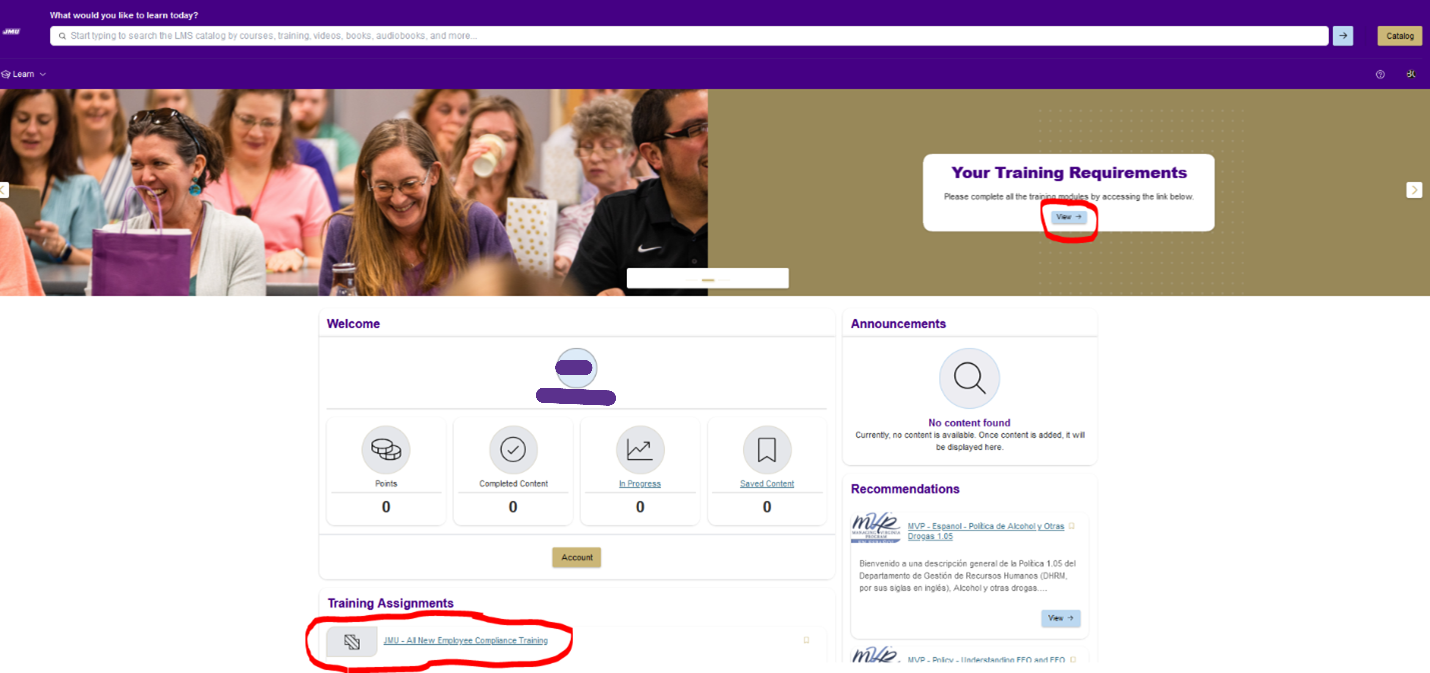
Step 2: The next screen will open. Click on the circled link.
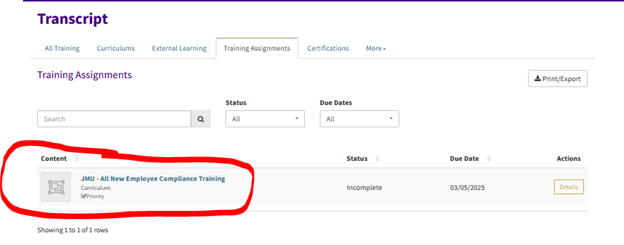
Step 3: Click “View Content”
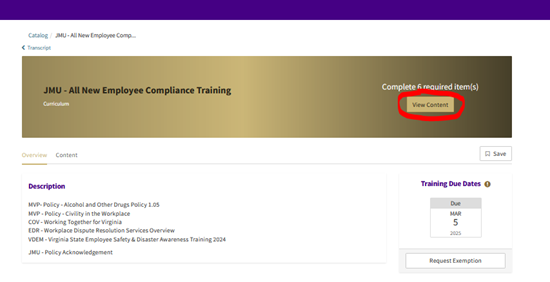
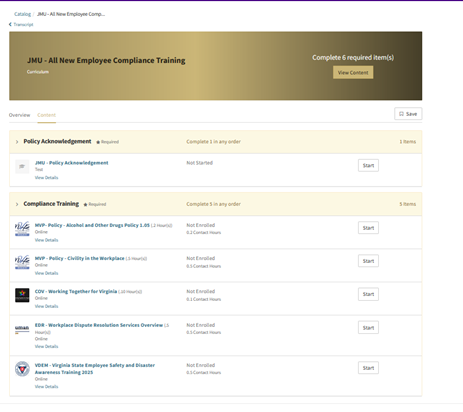
Step 4, Click start for each training/to-do:
Please turn off your browser's pop-up blocker and try again.
- I don't know my credentials or use my JMU email address. Can I use another email account?
- No, you must use your JMU account. Contact the JMU IT Help Desk for assistance.
- I use my Dukes JMU account, not my @jmu.edu account, is that okay?
- Students who are hired into wage positions often have @jmu.edu email accounts. It is recommended, and sometimes required, that you will use that account for your employment tasks. The @jmu.edu is the default account we use for the COVLC. Occassionally a student is not assigned a work account. Check with your supervisor or the Help Desk to see if you have one. If you don't, email hrcompliance@jmu.edu and we can change your log in to your Dukes account.
If you see incorrect data in the following fields, let us know by emailing hrcompliance@jmu.edu:
- Your manager
- Missing or incorrect supervisee(s)
Your transcript is a permanent record of all learning content in which you have been enrolled or participated, as well as content assigned to you. If you have attempted a learning item more than once, each attempt displays on your transcript.
- Navigate to the Transcript
- Hover over (or tab to) the Learn menu in the navigation bar. Note: If you tab to the menu, use the down arrow key to display menu options.
- Select the Transcript.
- Note: If you only have access to a single menu, the Transcript option displays in the navigation bar.
The following information displays next to the title of each training assignment:
- Status: Your current status for training item (i.e., completed, incomplete, or exempted).
- Period Due Date/Time: The date and time by which the training must be completed.
- Action button: This allows you to view more information about the training assignment.
To view more information about a training assignment, select the expand the Details Button for that item.
Email hrcompliance@jmu.edu to request an exemption. Please note that all employees are required to complete this training. The main reason for requesting an exemption is:
- You completed this training somewhere else (Proof of completion is required, see FAQ,
"I took this training at another state agency, do I need to take it again?")
The COVLC system contains very little personably identifiable information by which we can manage records. If you believe you have completed training that does not appear in your JMU COVLC account, please email hrcompliance@jmu.edu, and provide the following information:
- What former or current state agency or agencies might you have had an affiliation*?
- If you are currently employeed by another agency, are you considered full- or part-time?
- What was your former email address for the organization(s)?
- Do you have any former names, if so what are they?
If a duplicate record exists, we will merge your records so all of your training will appear in one record.
* Affiliation could include a training you taken from another university or agency, such as Virginia Department of Emergency Management, Virginia Department of Health, etc.)
Yes! The state learning system is available for your professional development. Check with your supervisor about how and if addition training fits into your work schedule.
In most cases, you will find learning content in the Catalog and then enroll in (or access) those items.
Search for learning items:
- Enter keywords or phrases in the Search for Content (or Search Catalog) field.
- Use the Competencies field to search for content associated with a given competency, if necessary.
- Select the Search button. A list of search results matching your criteria displays.
- Refine your search results, or select the title of an item to view additional information.
Yes. To access the self-help, click on the ? on the top toolbar.
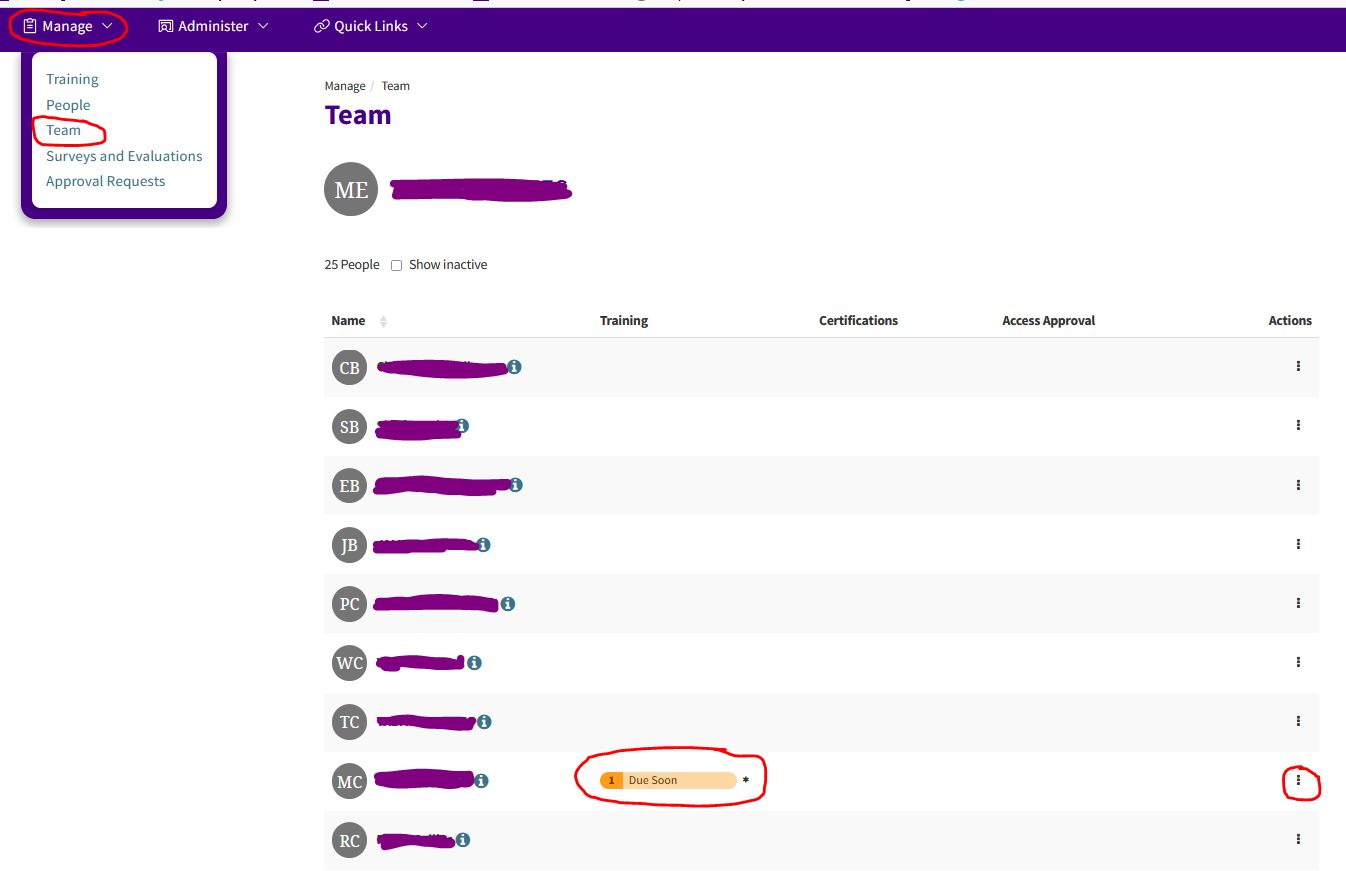
- After you log into the COVLC, go to the "Manage" Drop-down at the top of the page.
- Choose "Team."
- Your supervisees will be listed there.
- Note one employee in the screenshot below has an approaching deadline.
- To the right of each employee, use the three dot elipsis for more options.
- You can view their transcript
- Email them directly from the COVLC system. (Not recommended.)